SYZYGY is great!
I realized that SYZYGY was a good choice for prototyping after successfully running a DDC receiver on an HF receiver pod with relatively little effort. Yes, SYZYGY is great!
NASR-M board bring-up, USB adventures II
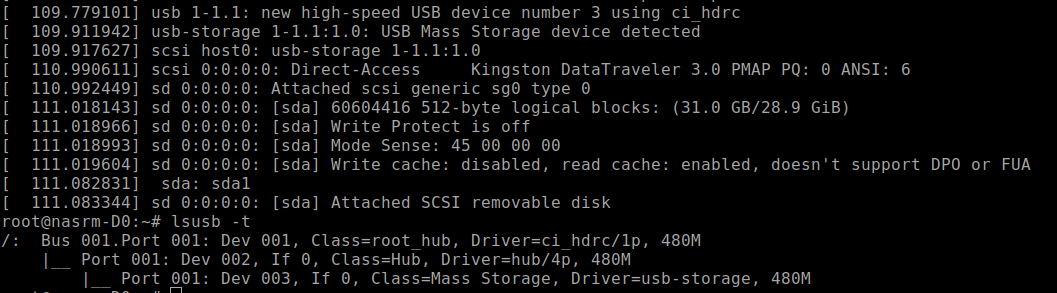
USB finally works. Now I’m able to connect an external USB hub to the socket and plug in thumb drives and USB hard disks. All works fine, except the USB-to-SATA converter, which is not soldered in yet. I saved that for the dessert, because I have other priorities.
This is the ‘lsusb -t’ picture of a thumb drive plugged into the USB socket.
NASR-M board bring-up, USB adventures
It’s USB show time! Xilinx documents suggest the USB3320 as a good USB PHY that works, and I’ve seen multiple development boards that use that chip. If it works for them, it will probably work for me, I thought. Despite being defined in Vivado hardware design, USB was not detected by the Linux kernel. Looking closely, I saw that a reference clock was ok, but there was no signal on the CLKOUT pin.
NASR-M board bring-up, first Linux boot
Today I was happily observing Linux boot messages on a NASR-M tty console. It was a major milestone in development. I decided to generate the PetaLinux image using the traditional workflow and leave the Yocto exploration for later. Sadly, good old PetaLinux tools will be deprecated in favor of Yocto in 2026.
NASR-M board bring-up, DDR3 test
Today is an important milestone in a board bring-up, as the DDR3 subsystem appears functional. I was able to run a Vivado bundled Zynq bare-metal DDR test with no errors. The test image was uploaded via JTAG and executed on a CPU core.
That was the most important indication of a system's health to me. Even if other subsystems don’t work properly, I’ll be able to respin the board with minimal effort. There are a few things to improve. Most importantly, the data strobe line length. Currently, the propagation delay between the strobe and data lines is very short, less than 0.01 nanoseconds. I suppose that contributed to somewhat narrow write eye width.
But hey, 65-71% is still ok, and definitely acceptable for a first prototype. Even without post-routing simulations, I’ve got a nice result. This routing won’t win the beauty contest, but at least it works, and someone may find it useful. Learn from my mistakes, kids :)
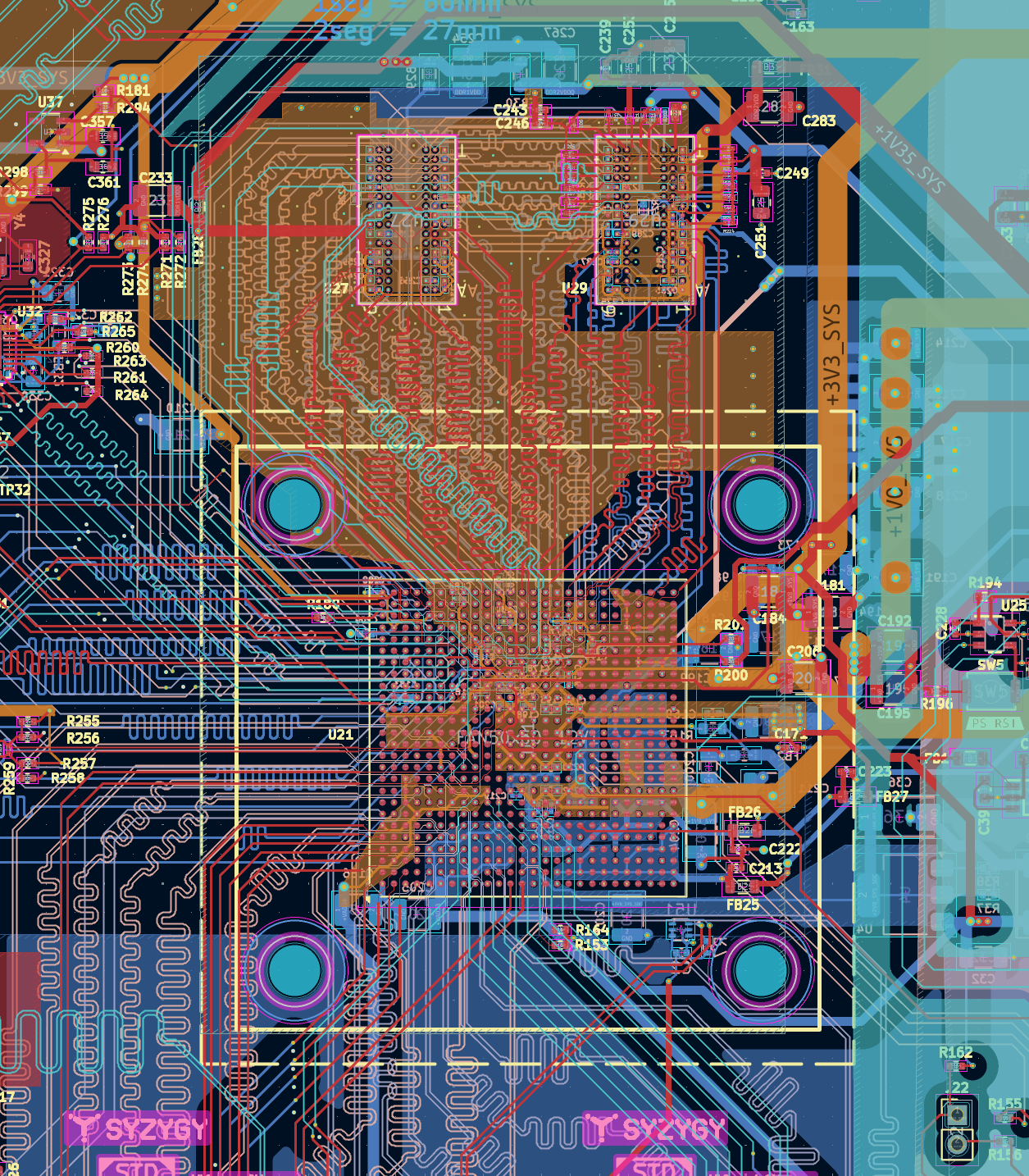
I’ve seen a lot of requests on the forums regarding fly-by topology applied to Zynq 7000, so here are a few tips and rules of thumb that worked for me:
NASR-M board bring-up, first JTAG connection
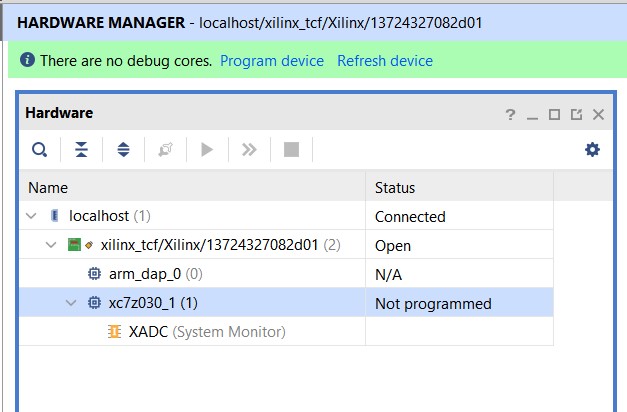
We’ve got a JTAG connection, ladies and gentlemen. My cheap Xilinx platform cable I ordered from AliExpress actually worked. I’ve got two of them. The first one didn’t work well and was pulling down the 3V3 power supply low, but the second one - bingo! The next step is a bare-metal CPU test.
Lessons learned: before succumbing to despair and unmotivated aggression, check the bootstrap pins and set them to JTAG Boot Mode (MIO[5 - 3] = 0, 0, 0), and don’t ever forget to set the MIO2 to 0 - Cascade mode.
UPDATE If you are using Vivadio in GNU/Linux, make sure that Xilinx platform cable drivers are installed and udev permissions are set. Xilinx provides an easy way:
    cd Xilinx/Vivado/2023.2/data/xicom/cable_drivers/lin64/install_script/install_drivers
    sudo ./install_drivers
NASR-M board bring-up, LMK03328 clock Zephyr OS driver
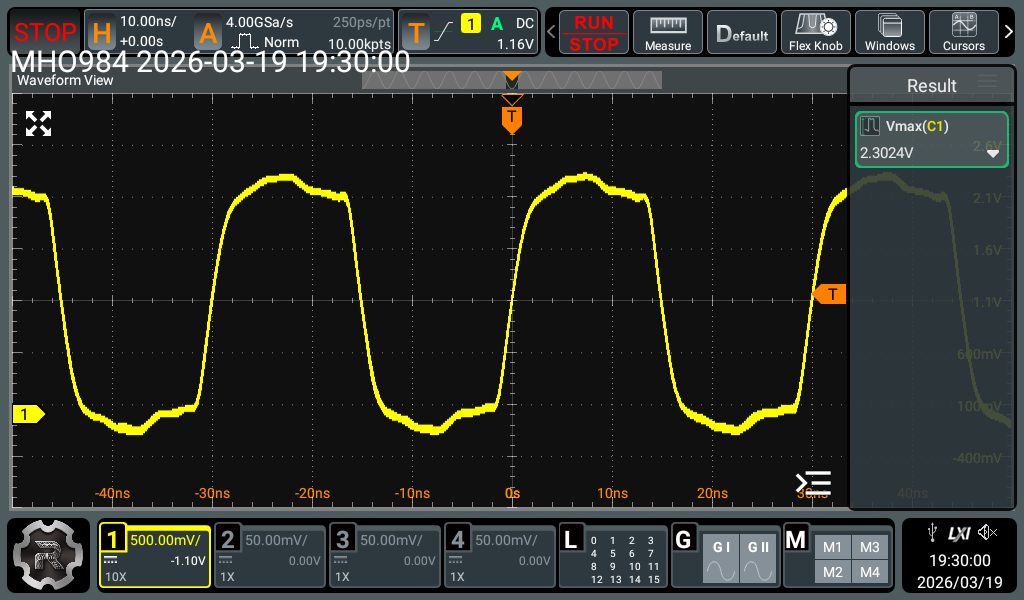
The LMK03328 clock driver is finally functional. Today, I was happily observing a sine-like signal at 33.33 MHz on the screen of my good old scope. I suppose it’s really a meander. Once I get a faster oscilloscope, I’ll be able to tell with confidence. What disappointed me was the low amplitude. The peak value was around 1.76 - 1.8V despite the 3.3V at the line #3 IO supply. The datasheet of LMK03328 states the following: “The 1.8-V LVCMOS driver supports rail-to-rail output swing only when powered from VDDO = 1.8 V +/- 5% (recommended VDDO for use with LVCMOS output format). VOH level is NOT rail-to-rail for VDDO = 2.5 V or 3.3 V due to the dropout voltage of the output channel’s internal LDO regulator.”
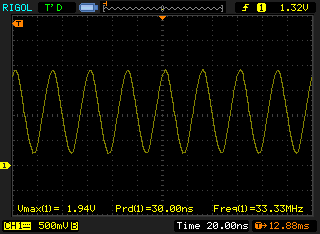
My expectation for peak amplitude was 2V or a little more. Let’s hope it's enough to clock the SOC. The driver for Zephyr OS is in a NASR-M-ZFW source tree. It’s a really simple one. First, it reads the register values described in a DTS, and then transfers them via the I2C. It works for me, and frankly speaking, I don’t want to spend any more time on this. At first, I tried to transfer the entire register config generated by TICS Pro, but that didn’t work. After a few tries, I had to cut out all register definitions that weren't related to the PLL or outputs, and it finally worked as expected.
Update The clock signal amplitude is ok. My oldie scope was not able to display the fast rising signal correctly. Here is the oscillogram made with a faster scope.
Here is a DTS example:
NASR-M board bring-up, TCXO adventures II
Yesterday’s TCXO drama was resolved in a more elegant way than surgery. I have always been a fan of conservative treatment, and decided to try one last option before attempting rework. That option was an AC termination of the TCXO’s signal. The datasheet doesn’t explicitly mention single-ended AC termination of the reference input, so it’s kind of a gray area, but it’s perfectly fine for bootstrapping the board. Long story short, I replaced the termination resistor R127 with a 1uF capacitor, and LMK03328 magically passed my reference signal to the output. This might not be the optimal solution in terms of stability, phase noise, e.t.c, but it kind of works for now. In the next board revision, I’ll reserve another footprint for a TCXO with a CMOS output and then compare which one performs better. I’m rooting for an existing clipped sine wave TCXO because of fast rise and fall times, but let’s see. Now I have to work on the Zephyr driver for LMK03328 to correctly configure all the dividers and multipliers for proper PLL operation. This may take some time... Schema with correction is under the cut.
NASR-M board bring-up, TCXO adventures
People who have never done a board bring-up would not understand the adrenaline rush of finding yet another bug. It’s a wild ride, just like an extreme sport. Despite your butt being glued to the chair, you get a kick just before pressing the power button on a freshly assembled circuit or when the device is finally doing what it’s supposed to do, responding perfectly to I2C control. Fasten your antistatic wrist bands, ladies and gentlemen. Our next adventure is TCXO.
NASR-M board bring-up, Zephyr driver for TCA6416 GPIO
My love for Zephyr OS grew bigger after the successful driver adventure. A few days ago, I realized that the TCA6416 I2C GPIO expander isn’t supported by Zephyr, which was a setback. The TCA6416 GPIO controls the PLL clock on the NASR-M board. I need it to configure the clock. The good news was that Zephyr supports its bigger brother, TCA6424, which has 3 GPIO cells and 24 IO’s.
NASR-M board bring-up, onboard PSU
I’ve just achieved a major milestone in board bringup. ADP5052 works! Initially, the SW2 channel wouldn't start, and I wasn’t able to fix it for quite a long time. There were no short circuits, and the load capacitance was adequate. I chased the cold joints for a while, but haven’t found any. The VREG pin was outputting 5.1V, so there was some hope I hadn’t fried the chip.
NASR-M board bring-up and Zephyr for a base controller
Zephyr firmware for the base controller is now working. I’ve spent some time setting up a device tree overlay to detect the I2C mux and the underlying devices. It works amazingly! The first thing I did after the firmware compiled initially was a shell module. Actually, it was one of the reasons behind switching to Zephyr. You can access the shell via UART, USB, or even Telnet. It’s extendable with user commands, supports tab completion, and offers many debugger features, such as I2C discovery and memory dumps. Zephyr has many advanced features, such as different schedulers, power management, and an IP stack, but what makes it attractive to me (besides the Apache 2 license) is its extensibility and hundreds of device drivers. It feels like moving away from Borland CRT to Turbovision back in the days. I was able to hook up a temperature sensor via the I2C mux with absolutely no effort. Nice, isn’t it?
NASR-M base controller works!
I’ve started populating the board, and the base controller worked. Although my long-term plan is to use a Zephyr, for simplicity, I resorted to a quick stub firmware written with STM32Cube that activates the ATX PSU and blinks the status LED. I’ve got the (primary) power!
The ever-growing “lessons learned” list has been updated with the following:
NASR-M clock generator preliminary config
The heart of the NASR-M carrier boards is the LMK03328 clock generator. It's an ultra-low noise and high-performance clock generator with two PLLs and eight outputs. The outputs can be set to single-ended or differential with an adjustable voltage level. The chip can switch between two reference inputs and is configured with I2C. In my case, the main reference input is the onboard TCXO, and the secondary is an external reference.
X-Ray BGA inspection photos
Ever wondered what BGA X-Ray inspection reports look like? Here is a sample from JLCPCB. It cost me around $2. Photos are under the cut.
NASR-M first prototype production
Yesterday, I sent the initial NASR-M prototype for production to JLCPCB. Hoping there will be no obvious blockers and I'll be able to bootstrap Linux with no re-spins. I want to bring the board up circuit by circuit to know precisely what works and what doesn't.
NASR-M SYZYGY carrier board
NASR-M
Some time ago, I decided to try Xilinx Zynq, which everyone is using in their RF projects. And what is a better option for exploring a new chip than making a board around it? Spending some money on a reference design devkit from the manufacturer? No, that's certainly not my way of learning things.
My dream board had 1GB of 32-bit-wide DDR3 RAM, SYZYGY ports, a standard ATX power supply, 1Gb ethernet port, and remote management that would allow me to flash firmware, control the system remotely, and export temperature and power usage readings to let me debug comfortably. Since that's my first rather complex embedded board in KiCad, I have made some dubious choices with PCB stackup, component placement, and routing. Sounds counterintuitive, but that was already a great learning experience in how not to do things and which design choices to avoid. It may work, however. I am pretty concerned about the DDR3 part, which was the most challenging part to route.
But if it works, I would have an excellent opportunity to play with software radio on a different level. And by different level, I mean a system built from scratch. Long story short, it's on a GitHub, completely open "with open-source everything". Once the board boots up, I will publish the Vivado design and the board MCU firmware sources. This will take some time, though. Once I'm more confident in design, I'll order PCBs from JLCPCB, and it will take even more time to solder the components in circuit by circuit, starting with the MCU, then the secondary PSU, and the rest. Scroll down into the long list of things that could break if you are interested in this rather dramatic development.
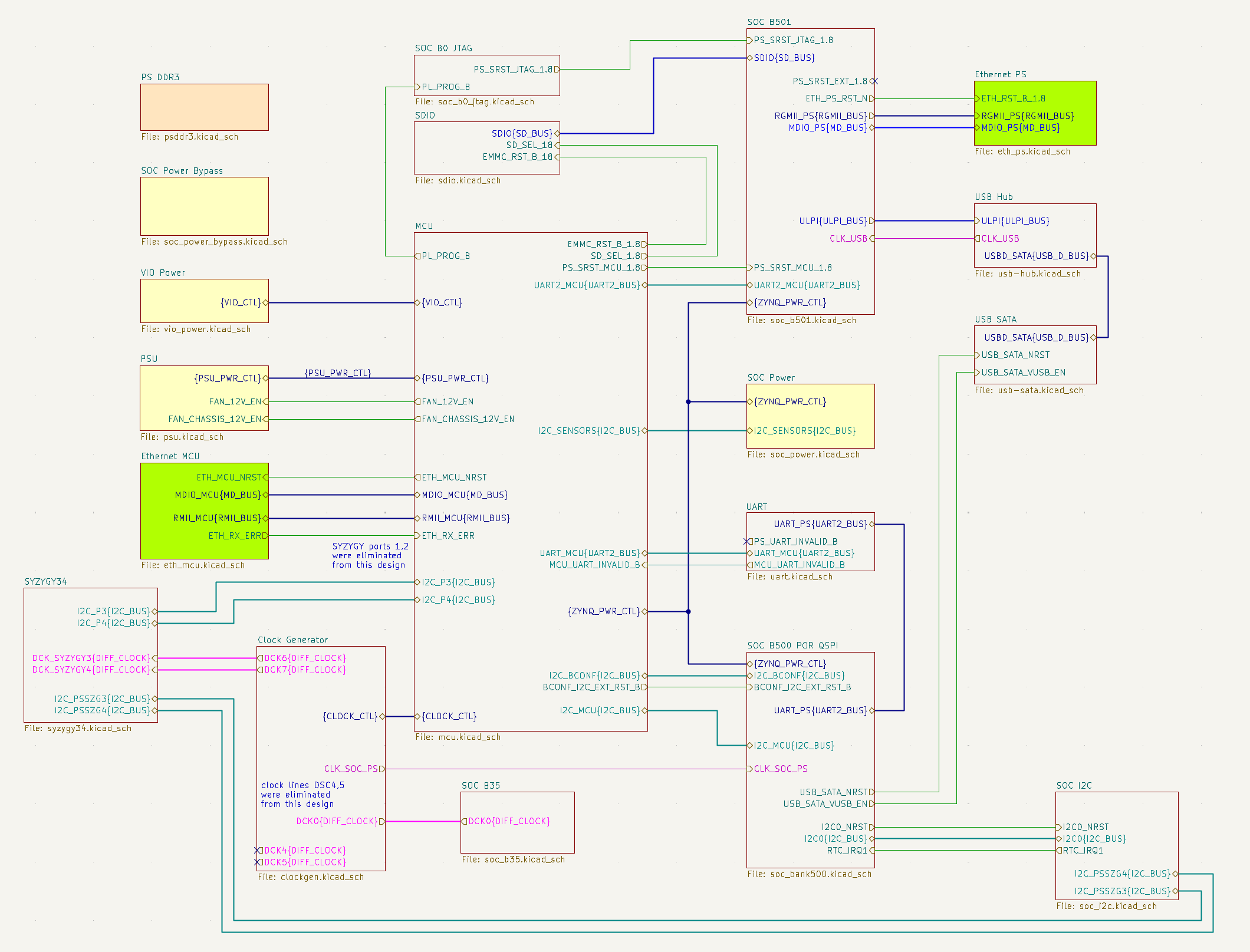
Design is made with KiCad 9. Below is a high-level overview of fundamental blocks.