NASR-M board bring-up, USB adventures II
USB finally works. Now I’m able to connect an external USB hub to the socket and plug in thumb drives and USB hard disks. All works fine, except the USB-to-SATA converter, which is not soldered in yet. I saved that for the dessert, because I have other priorities.
This is the ‘lsusb -t’ picture of a thumb drive plugged into the USB socket.
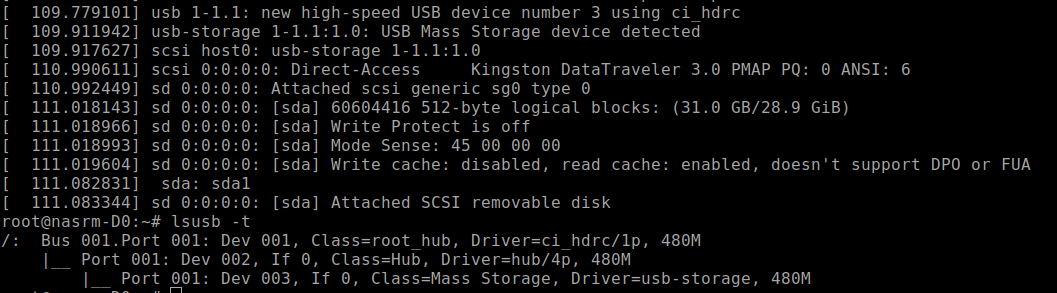
To save you the reading time, I will quickly summarize how it worked.
Since most of the USB circuitry is onboard, there is no need to mess with VBUS sensors. Initially, I thought a single USB reset GPIO line was sufficient to handle both the transceiver and the hub, and it somehow worked. Perhaps a better solution is to allocate another GPIO pin for a hub's reset.
I’m skipping a lot of trial and error here and highlighting only what worked.
To reset the ULPI PHY, I’ve patched the U-Boot to reset MIO50 for half a second before loading the kernel. There is a nice way to do that with a U-Boot script, but for me, a patch is a more familiar way of fixing things. Yes, I’m old fashioned. The patch helped with the discovery of USB3320 at boot time. However, I still had USB hub initialization issues until I enabled the CONFIG_USB_ONBOARD_DEV kernel option. After that, the kernel repeatedly retried autodiscovery, making CY7C65632 initialization reliable.
Configure the CHIPIDEA controller, because Zynq 7000 PS uses it for USB:
CONFIG_USB_CHIPIDEA=y
CONFIG_USB_CHIPIDEA_HOST=y
CONFIG_USB_CHIPIDEA_PCI=y
CONFIG_USB_CHIPIDEA_MSM=y
CONFIG_USB_CHIPIDEA_NPCM=y
CONFIG_USB_CHIPIDEA_IMX=y
CONFIG_USB_CHIPIDEA_GENERIC=y
CONFIG_USB_CHIPIDEA_TEGRA=y
This is for USB3320 ULPI PHY:
CONFIG_USB_ULPI_BUS=y
CONFIG_USB_ULPI=y
CONFIG_USB_ULPI_VIEWPORT=y
This is important. That’s a solution to the USB hub initialization issue.
CONFIG_USB_ONBOARD_DEV=y